DigiLocker and CKYC Demystified: A First-Time Investor’s Guide to Completing KYC


A first-time investor’s guide to completing KYC without getting lost in unfamiliar terminology.
You find a listed corporate bond that appears relevant to your requirements. You review its credit rating, maturity date, cash-flow structure and risk factors before deciding to proceed.
You enter your mobile number, verify the OTP and begin onboarding.
The next screen asks you to retrieve your Central KYC record or share an identity document through DigiLocker.
For many first-time investors, this is where the process becomes unfamiliar:
- What is CKYC?
- How is it different from regular KYC?
- Why is DigiLocker being used?
- What information will be shared?
- What should you do if verification fails?
This guide explains how these systems work, how they differ and how to resolve some common onboarding issues.
CKYC, KRA and DigiLocker: What Is the Difference?
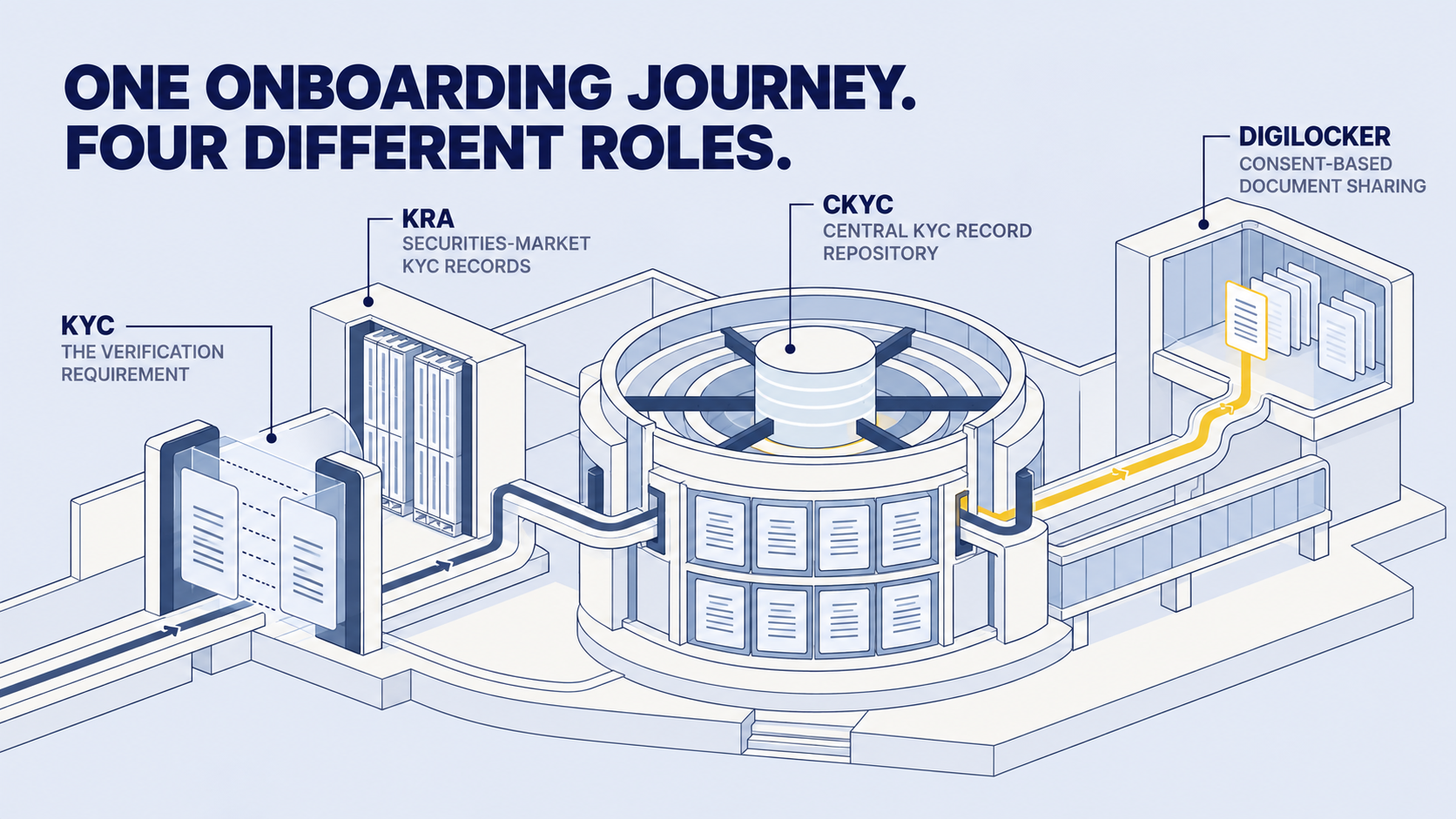
These terms are connected, but they do not mean the same thing.
KYC is the verification requirement. KRA and CKYC maintain different KYC-record infrastructures. DigiLocker helps users access and share eligible digital documents.
1. What Happens During Investment Onboarding?
Before permitting transactions in securities, a regulated intermediary must complete the applicable KYC and verification requirements.
Depending on your existing records and the platform’s onboarding process, this may involve:
- Entering your PAN and basic personal information
- Checking an existing KRA or CKYC record
- Verifying your identity and address documents
- Confirming your bank and Demat account details
- Completing additional verification where required
- Reviewing and accepting the applicable declarations
The exact journey may vary depending on your KYC status, the documents available and the platform’s regulatory requirements.
Completing KYC does not mean that an investment has been assessed as suitable for you. It only completes the applicable identity and verification process.
2. What Is CKYC?
Central KYC is a centralised repository of KYC records operated by the Central Registry of Securitisation Asset Reconstruction and Security Interest of India, commonly known as CERSAI.
When an eligible financial institution completes and registers your CKYC, a unique KYC Identifier may be issued.
A CKYC record may contain information such as:
- Name
- Date of birth
- Address
- Identity-document details
- Photograph
- Contact information
- KYC status
During onboarding, an authorised entity may attempt to retrieve your CKYC record after completing the required authentication and consent steps.
What if a CKYC record is available?
If your record is available, complete and current, some information may be retrieved without requiring you to upload every document again.
Additional documents or verification may still be required if:
- The existing record is outdated
- Mandatory information is missing
- Your details do not match
- Your address has changed
- A document has expired
- Further verification or enhanced due diligence is required
What if a CKYC record is unavailable?
You may be asked to complete KYC through another supported route, such as DigiLocker-based document sharing, Aadhaar-based verification where permitted, uploading officially valid documents, video verification or in-person verification.
The alternatives available will depend on the platform’s onboarding process and the applicable regulations.
3. What Is DigiLocker?
DigiLocker is a digital-document platform under the Government of India’s Digital India programme. It allows users to access, store, share and verify eligible digital documents.
During onboarding, a platform may redirect you to an authorised DigiLocker interface. You can authenticate yourself, review the request and consent to sharing the specified document or information.
What DigiLocker does not mean
Using DigiLocker does not mean that an investment platform automatically receives unrestricted access to everything in your account.
Before approving a request, review the requesting organisation, the document being requested, the stated purpose, the displayed consent and the website or application through which authentication is taking place.
Never disclose your DigiLocker password, Aadhaar OTP, banking OTP, Demat PIN or account password to another person.
4. Is DigiLocker Mandatory?
Completing the applicable KYC requirements is mandatory before undertaking relevant securities-market transactions.
DigiLocker itself may be one of several supported ways to complete document verification. Whether another route is available depends on the intermediary’s onboarding process and the applicable regulatory requirements.
If you do not wish to use DigiLocker—or cannot complete the process—check whether the platform supports manual document upload, another permitted digital KYC method, video verification or assisted onboarding.
Do not assume that every platform offers the same alternatives or processing timelines.
5. Why Is KYC Required?
KYC helps regulated intermediaries confirm an investor’s identity and address, reduce identity misuse, meet anti-money-laundering requirements, maintain accurate records and support regulatory reporting and grievance handling.
KYC is an identity-verification process—not an investment-risk check.
Completing KYC does not reduce the credit, interest-rate, market or liquidity risks associated with a bond.
6. Common Onboarding Problems and How to Resolve Them
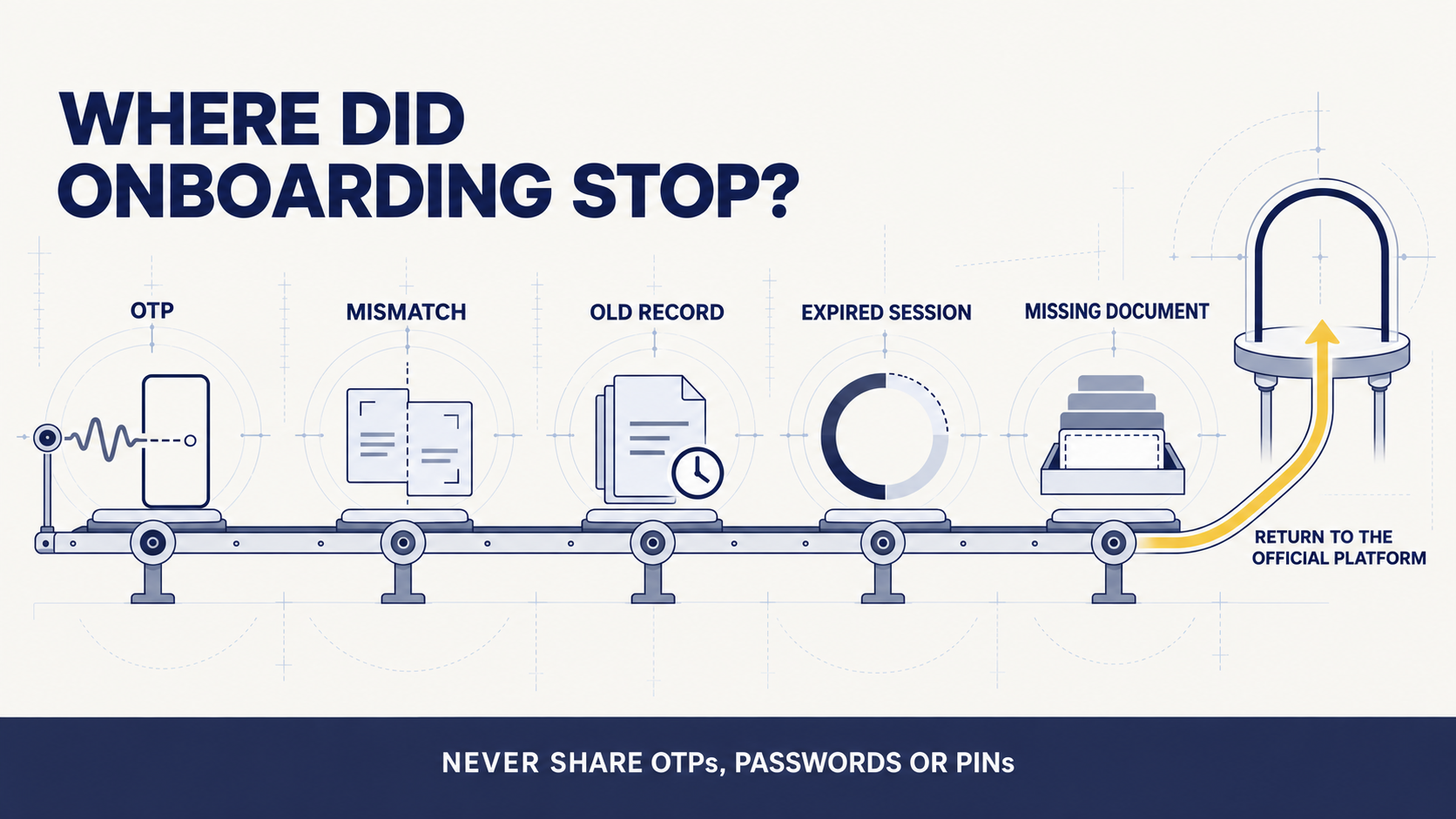
Problem 1: You Are Not Receiving the OTP
Depending on the verification route, an OTP may be sent to the mobile number associated with Aadhaar, DigiLocker or another relevant account.
Confirm that the displayed mobile-number digits are correct, check your mobile network and SMS inbox, avoid repeatedly requesting OTPs and restart the process if the session has expired.
UIDAI’s Aadhaar app currently supports mobile-number updates in certain situations. If you do not have access to the old registered mobile number, or a mobile number was never registered with Aadhaar, UIDAI requires you to visit an Aadhaar Seva Kendra or an authorised enrolment and update centre.
Always use official UIDAI channels when updating Aadhaar details.
Problem 2: Your Name or Date of Birth Does Not Match
Verification may fail when your details differ across PAN, Aadhaar, bank, Demat or KYC records. Common causes include initials, surname formats, spelling variations, a surname changed after marriage or different date-of-birth records.
Compare the information displayed on each document. If you identify a mismatch, contact the platform’s official support or compliance team to understand which record requires correction.
You may need to update the relevant government record, bank or Demat details, submit an accepted supporting document or complete additional verification.
Problem 3: Your CKYC Record Is Old or Incomplete
Having a CKYC record does not always mean that onboarding will be completed automatically. It may contain an old address, inactive mobile number, missing information, outdated photograph, mismatched details or expired documents.
Follow the update process communicated by the platform or relevant KYC intermediary. Additional documents or verification may be required before the record can be accepted.
Problem 4: The DigiLocker Session Expires
Close the expired session, return to the official platform, restart the DigiLocker connection and complete authentication without switching repeatedly between devices.
If the error continues, take a screenshot that does not expose an OTP, Aadhaar number, password, PIN or other sensitive information. Share it only through the platform’s official support channel.
Problem 5: The Requested Document Is Not Available
Confirm that you are using the correct DigiLocker account, check whether the relevant issuer provides the document through DigiLocker and follow DigiLocker’s official process to fetch it. Use an alternative verification method if the platform provides one.
7. How to Protect Your Information
Check the Website
Use only the official website or application of the regulated intermediary. When redirected, confirm that the authentication page belongs to the expected service.
Read the Consent Request
Review what information is being requested and why before approving access.
Protect Your Credentials
Never disclose OTPs, passwords, Aadhaar app PINs, UPI PINs, Demat PINs, screen-sharing access or remote-access permissions. A genuine support representative should not ask you to disclose these credentials.
Use Official Support Channels
If onboarding fails, contact the support details published on the platform’s official website. Avoid unsolicited messages or calls offering to complete KYC on your behalf.
Review the Privacy Policy
Review what information is collected, why it is collected, how it may be used, with whom it may be shared, how long it may be retained and how to raise a privacy or grievance request.
8. Is KYC Permanent?
KYC is not necessarily a permanent, one-time approval. You may be asked to update or revalidate your information if your name, address or contact information changes; your record is incomplete; a document expires; regulations require revalidation; or a material discrepancy is detected.
Keeping your PAN, Aadhaar, bank, Demat and KYC records consistent can help reduce onboarding delays.
Before You Restart Onboarding
Keep the following ready:
- PAN
- Aadhaar or another accepted identity document
- Access to your registered mobile number
- Bank-account proof, if requested
- Demat-account details
- A stable internet connection
Also check that your name, date of birth and address are consistent across the relevant records.
Key Takeaway
- CKYC helps authorised reporting entities retrieve an existing central KYC record.
- DigiLocker enables users to access and share eligible digital documents through an authenticated, consent-based process.
- KRA verification supports the maintenance and validation of KYC records in the securities market.
These steps may feel unfamiliar during a first investment journey. Understanding what is being requested—and reviewing the consent carefully—can make onboarding easier and more secure.
Complete Your Onboarding on Equirize
Review the information being requested, keep your documents ready and complete every verification step through the official Equirize onboarding journey. If you encounter an error, contact Equirize through its official support channel before submitting documents through any alternative route.
Risk Disclosure
Investments in listed corporate bonds and other debt securities are subject to market risks, including credit risk, interest-rate risk and liquidity risk. Returns and repayment are not guaranteed. Credit ratings are opinions regarding credit risk and are not recommendations to buy, sell or hold any security. Please review the offer document, term sheet, credit-rating rationale and applicable risk factors carefully before investing.
Privacy and Educational Disclaimer
This content is provided for general informational and educational purposes. The exact KYC process, accepted documents and processing timelines may vary based on the investor’s circumstances, the intermediary’s process and applicable regulatory requirements. Do not share passwords, OTPs, PINs or other authentication credentials with anyone. Use only official websites, applications and support channels.